Spie Batignolles
Designed a construction app connecting site crews' real workflows to a complex ERP, replacing 3 legacy tools with a single interface to manage personnel, equipment and procurement
Problem
Spie Batignolles ran on legacy tools and an aging ERP that slowed procurement and scattered data across modules. The value of a new system was obvious; adoption was not. The crews feeding the data log hours, equipment, and material orders on site, and they won't touch an ERP. The real challenge was designing an app layer that meets site users' needs while staying compliant with the ERP's architecture.
Target audience
Construction site managers and foremen who log their crews' hours, equipment use and material orders every day.
Team
- 1 Lead UX/UI Designer (+10 yrs)
- Me as UX/UI Designer
- ~10-person ERP implementation team
Key results
- 4 operational modules integrated in one interface adapted to site users daily workflows, with all data centralised in a single ERP, replacing 3 legacy tools
- 12 site users rated the tool positively in usability tests (avg. SUS 83), highlighting the frictionless data flow and cross-functional interactions between modules.
How I solved this problem
1. Mapped the on-site ecosystem to understand its stakeholders and their interactions
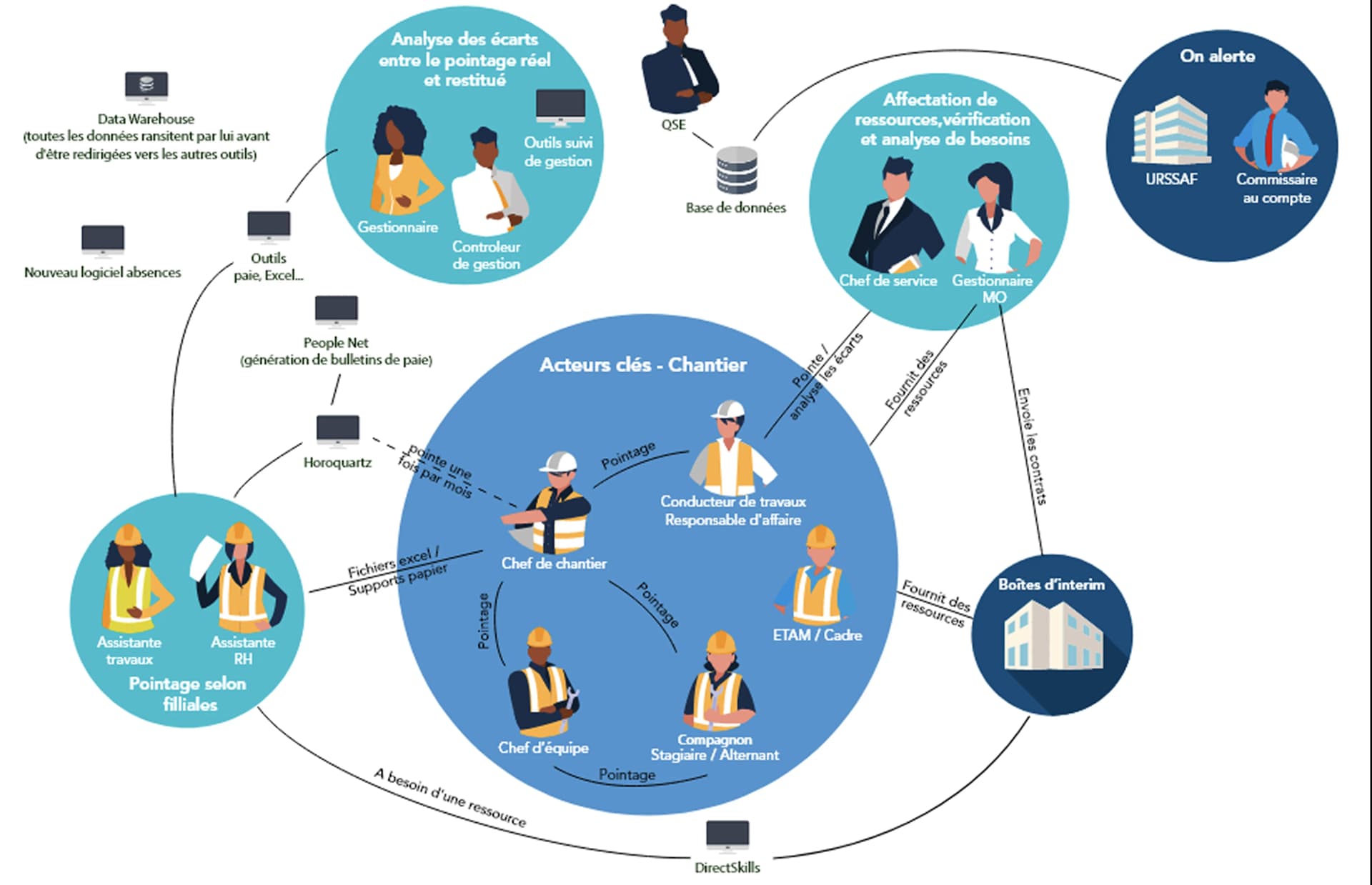
The goal was to immerse in the trade before designing anything: who is involved, how they are organised, which interactions matter, and whose sign-off we would need. This surfaced our two key users, the right people to invite to workshops, and the decision-makers to keep in the loop.
2. Ran 12 interviews to identify the pain points and opportunities for each module
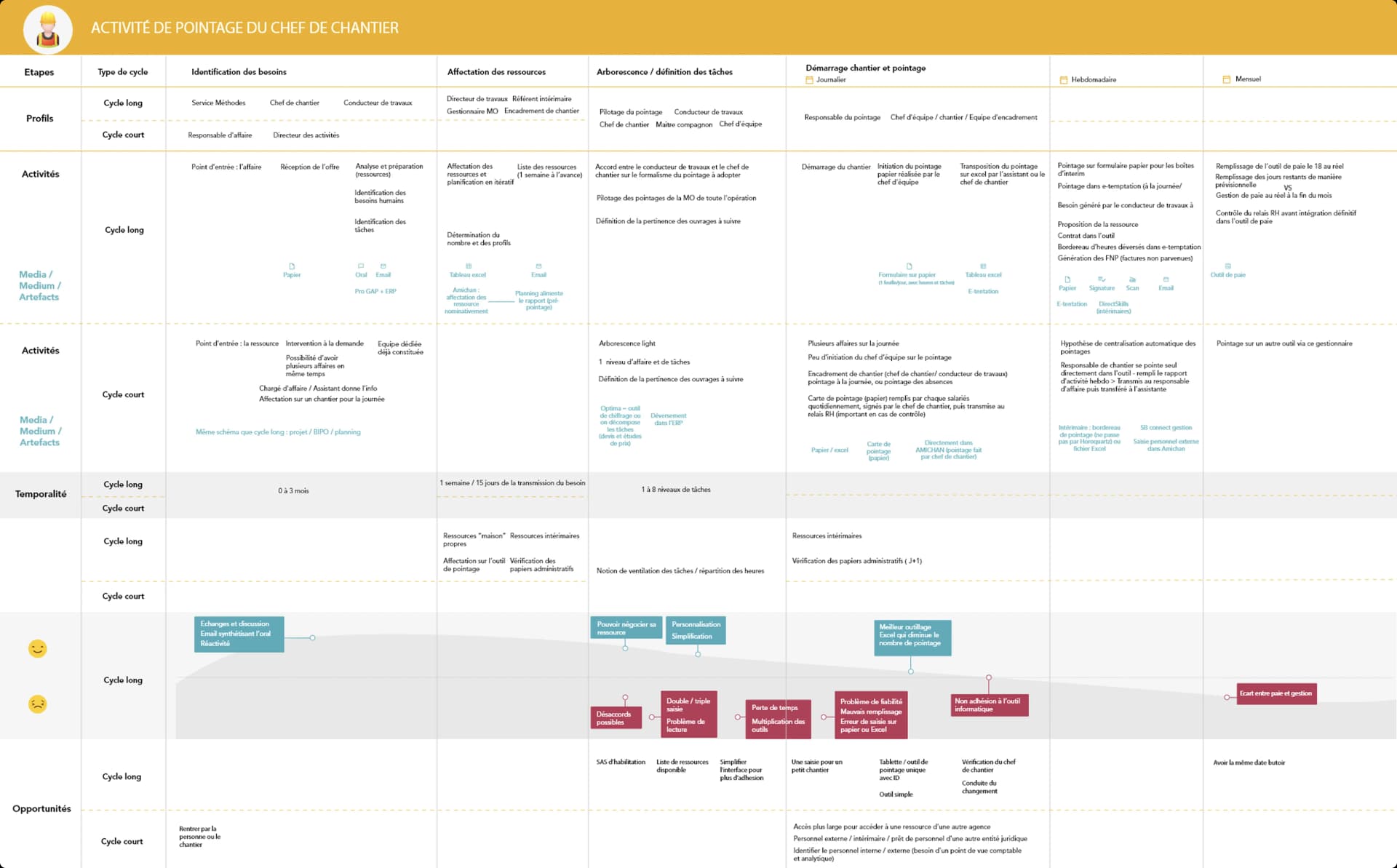
Talking to site managers and foremen on the ground, module by module, turned vague complaints into concrete facts: the same data re-entered everywhere, orders stalled by a missing field, errors that broke monitoring downstream. These became the shared base for every later workshop.
3. Helped real users, the product team and stakeholders align on the problems to solve
Across 4 workshops, with stakeholders and business reps from each module, real users with 10+ years on site, we used the user journeys and a prioritisation matrix to help them agree on what the first version had to fix and what could wait. Three problems came out on top:
- Cut procurement time: the legacy tools were slow and underpowered, so ordering material took far too long.
- Increase information sharing across the 4 modules, so data entered once is reused everywhere.
- Reduce manual data entry, time-consuming and prone to error.
4. Led 12 co-design workshops to align site crews and ERP tech on the new business and user workflows
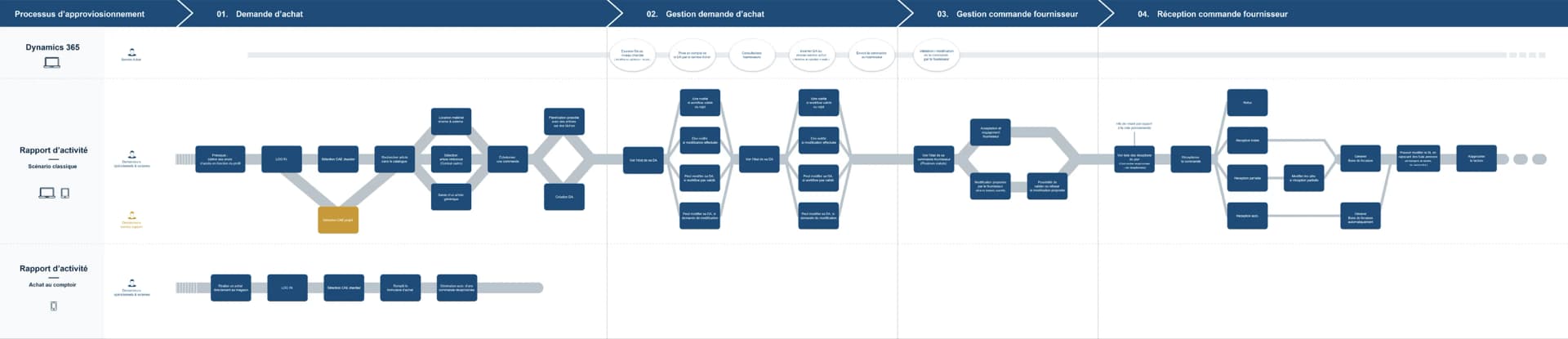
Across 12 sessions we brought end users together with the product, technical and ERP teams. Our role was to lead that alignment and to bring the artefacts that made it concrete: as-is journeys and drafts of the to-be flows. Those visuals gave non-digital participants something to react to, and let the technical team check feasibility on the spot.
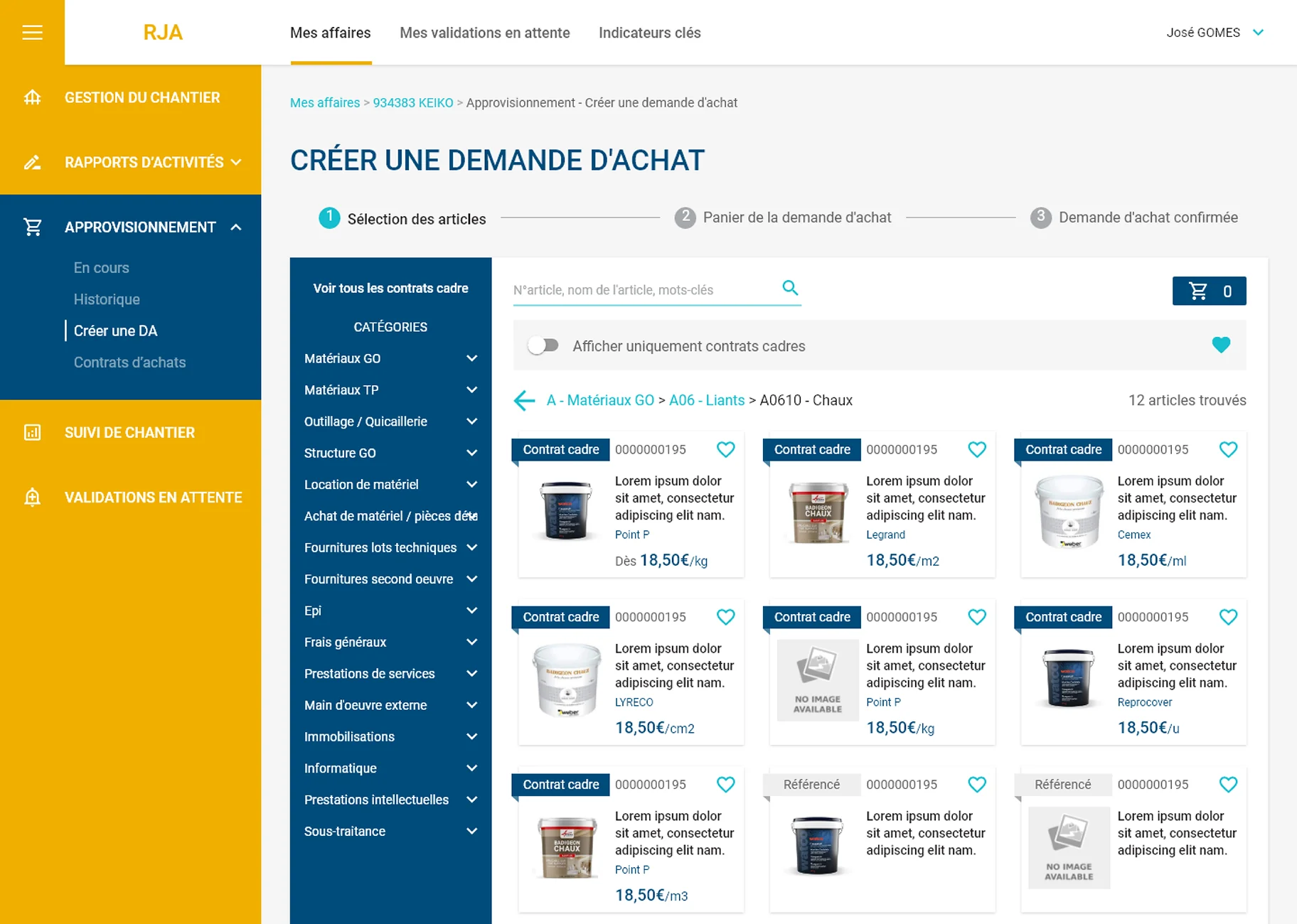
5. Designed 72 screens unifying the 4 modules to share data and cut manual entry
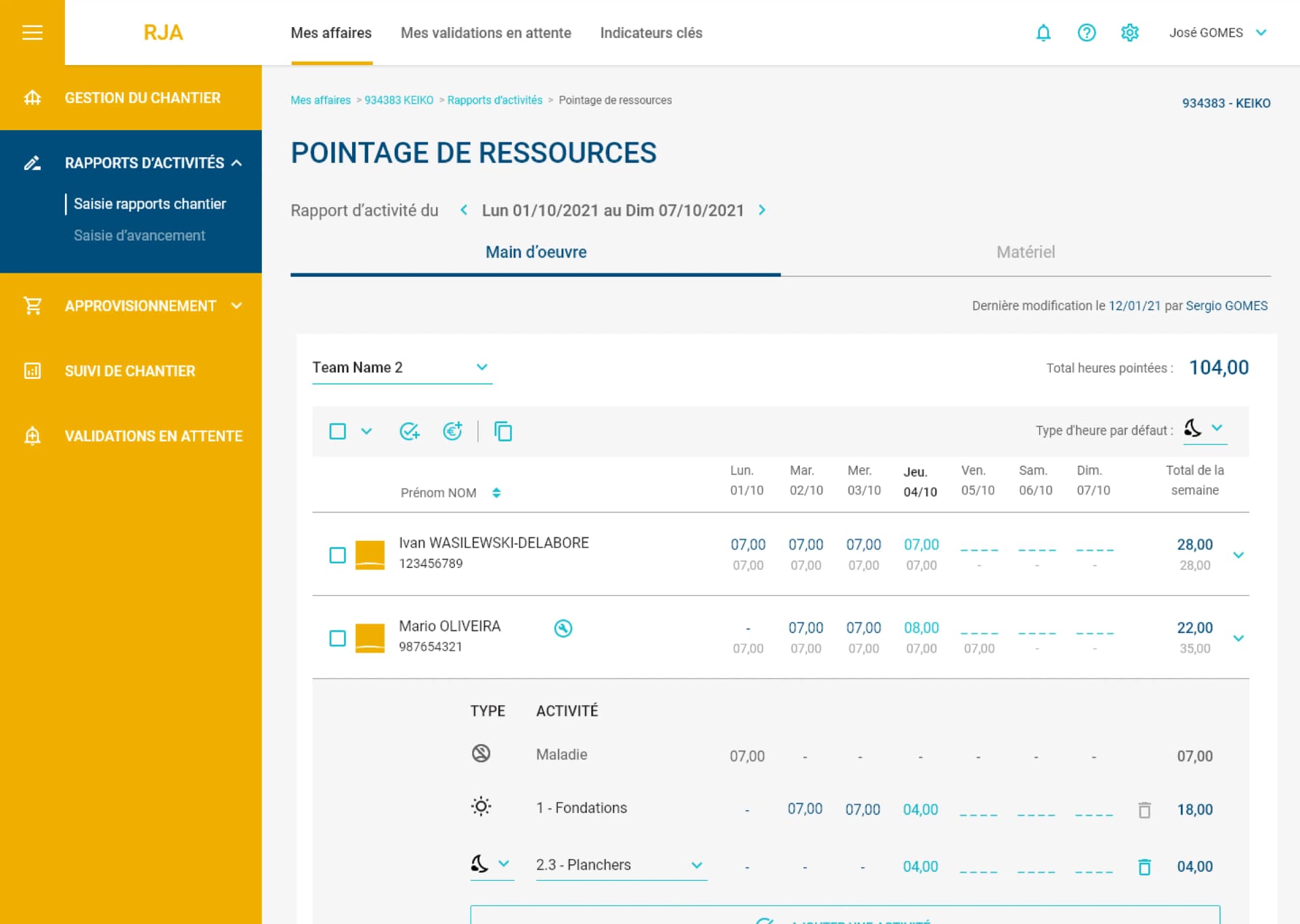
Unifying the 4 modules into one source of truth let data flow across the site and made monitoring real-time instead of catch-up. The screen work focused on the most repeated daily tasks, with features built to remove manual data collection:
- Group entry: log time and equipment for several crew members at once.
- Automated entry from context, pre-filling repeated fields.
- Smart pre-filled dropdowns to remove repetitive picks.
6. Improved data versioning and history to better match real site workflows (SUS 83, 12 users)
Usability tests on site showed crews rarely have perfect visibility when they log: figures change, several people complete the same report, often not on the same day. We improved versioning and history so the tool let them correct and adjust their data to match that reality. Apart from that, feedback was strongly positive on data-entry ease and navigation, with an average SUS score of 83 across 12 participants.
What we delivered
- A new SaaS replacing 3 legacy tools with one harmonised interface adapted to the daily usage of site users, communicating with Microsoft Dynamics ERP as the system of record for business processes.
- 72 screens shipped across desktop and mobile, with automated entry, smart pre-filled dropdowns and group entry for crew pointage to cut the most repeated manual tasks.
- A design kit, style guide and screen specs handed off to the ERP dev team, plus the documentation of the design process: identified problems, redesigned workflows, and the rationale behind every key decision.
- A full research and process archive owned by the client team: 16 workshop write-ups, 12 interviews, 12 usability tests, as-is and to-be journeys for every module, plus the documentation of every redesigned process.